Synchronize! X Plus

Synchronize! X Plus
License:
Trial version
Language:
English
Developer:
Developer's website
OS:
Mac OS X
Added:
See detailed info

Softonic review

Nick Mead

“Simple and fast Mac backup and sync tool”

by Nick Mead about Synchronize! X Plus

The developer of Synchronize! X Plus, Qdea, was one of the first to create a synchronization tool for Macs back in the early 1990's so if it's experience you're after, you can't go far wrong.

Synchronize! X Plus is a personal file synchronization and backup utility designed specifically for Macs. It takes advantage of 'pre-emptive multitasking', the full capabilities of the OS X file system, including 255-character Unicode file names and OS X file permissions. What's most impressive is the speed of synchronization with Synchronize X Plus! because files are copied at the maximum speed possible in OS X.

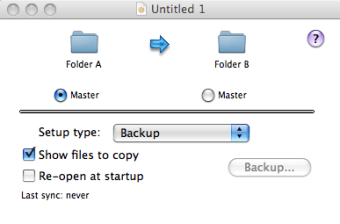
The app works via a very small and lightweight interface, which displays simply the target and destination folder. Browse to the targets you want them both to represent and select either Backup or Synchronization, then click the action button and you're done. You can configure from a selection of sounds to inform you when the transfer or backup is done.

The simplicity and speed of Synchronize! X Plus are its strong points. However, it can only handle one folder at a time, which could make syncing a bit painstaking unless you only want to backup one folder. An additional concern is that of privacy. Synchronize! X Plus requires you to submit a license number and computer ID over the internet to register and identify it. Although this is not designed to track you, some people may have be concerned about the privacy implications of this.

If you're looking for a simple and fast backup or sync tool for Macs, Synchronize! X Plus is an excellent choice.

Pros
  • Very simple to use
  • Performs backups and syncing
  • Very fast
Cons
  • Only backup/sync one folder at a time
  • May raise privacy concerns
Download Synchronize! X Plus 3.7.1

Synchronize! X Plus is virus free

We have analyzed the latest version of Synchronize! X Plus with 30 antivirus engines and it is virus free. See analysis results.

TESTED VIRUS FREE - Softonic GUARANTEED

Review and rate Synchronize! X Plus

Your avatar

Your opinion is important.
Help other users - be the first to review this program.

Review
  1. Maximum: 75 characters

  2. See example

Pros and Cons
Rate
  1. What rating would you give Synchronize! X Plus?

    You need to fill in all fields

    • Usability:

      Not rated
    • Stability:

      Not rated
    • Installation:

      Not rated
    • Functionality:

      Not rated
    • Appearance:

      Not rated
    • Overall rating:

      Not rated
  2. Don't worry, we won't make your email address public.

You're not allowed to share serial numbers, cracks, etc. or link to pages that contain them. If you do, your user account will be deleted, your IP address logged and legal action will be taken.

Get started - just ask a question!

Write a title for your question.

Alternativesto Synchronize! X Plus

  • In English:
    Remote Desktop Client
    Remote Desktop Client

    Connect your Mac to a PC and share files

    Softonic rating:
    • 8/10
    User rating:
    • 8/10
  • Free:
    Google Drive
    Google Drive

    Google's online storage solution

    Softonic rating:
    • 9/10
    User rating:
    • 6/10
Compare with Synchronize! X Plus

Screenshots from Synchronize! X Plus

Download rank: Synchronization

30 of 30

Softonic rating:
  • Very good
  • 8/10
Your rating:
Your rating
  • 0

Review and rate this program

Top Downloads: Synchronization

  • United States
  • Global

  1. Share your iPhoto and iTunes libraries with your Xbox 360

Reviews of Synchronize! X Plus in other languages